NationBuilder CSV Importer Tool
This guide explains how administrators can use the NationBuilder CSV Importer Tool to create pages from a CSV file.
#Activating the Tool
- Install Public Theme 2026 (
fp-public-theme-2026), which includes the tool. For an existing theme, you can instead copy the importer module's HTML and JavaScript from the public theme and connect them to your theme's module system. - Create a new basic page (for example,
admin-import-csv-pages) and add the tagmodule:admin-import-csv-pages. - Open the page while signed in as an administrator.
Creating the Spreadsheet
Create a spreadsheet with one row per page, then export it as a CSV file. Use these column headers:
type, slug, parent, headline, content, excerpt, tags
All column headers are required except excerpt. However, cells in the parent, content, and tags columns may be blank.
type: The NationBuilder page type. Set this tobasic; other page types are not currently supported.slug: A unique URL slug for the page. Use lowercase letters, numbers, hyphens, or underscores.parent: An optional parent-page slug. This can refer to another page in the CSV or an existing NationBuilder page. Leave it blank for a page with no parent.headline: The required page headline. The tool also uses this value as the internal page name.content: Optional page content. HTML is preserved; plain-text lines are converted into paragraphs.excerpt: Not currently working. This column is intended for a page summary. Leave it blank or omit the column until excerpt importing is fixed.tags: Optional page tags, separated by commas or new lines within the cell.
If you edit the CSV directly, enclose any cell containing commas or line breaks in double quotes. Escape a double quote within a quoted cell by doubling it (""). Spreadsheet CSV exports normally handle this for you.
Beta Limitations
The tool is still in beta and is being refined:
headlineis required and also supplies the internal page name. Possible future changes include using the slug when the headline is missing or adding a separate name column.- Excerpt importing is not currently working. The planned fix is to use the V2 API for this field.
- Check for slug conflicts with existing pages before importing. Even a new NationBuilder site may already contain default pages.
- Unfortunately if using the 'subpage layout', the import tool cannot automatically turn on the Include in supporter nav checkbox. This checkbox will need to be manually checked for any subpages after import. Note if using the "Visual Edit" system in the future, no manual steps will be needed as it uses tags for ordering the subpages.
Importing the CSV
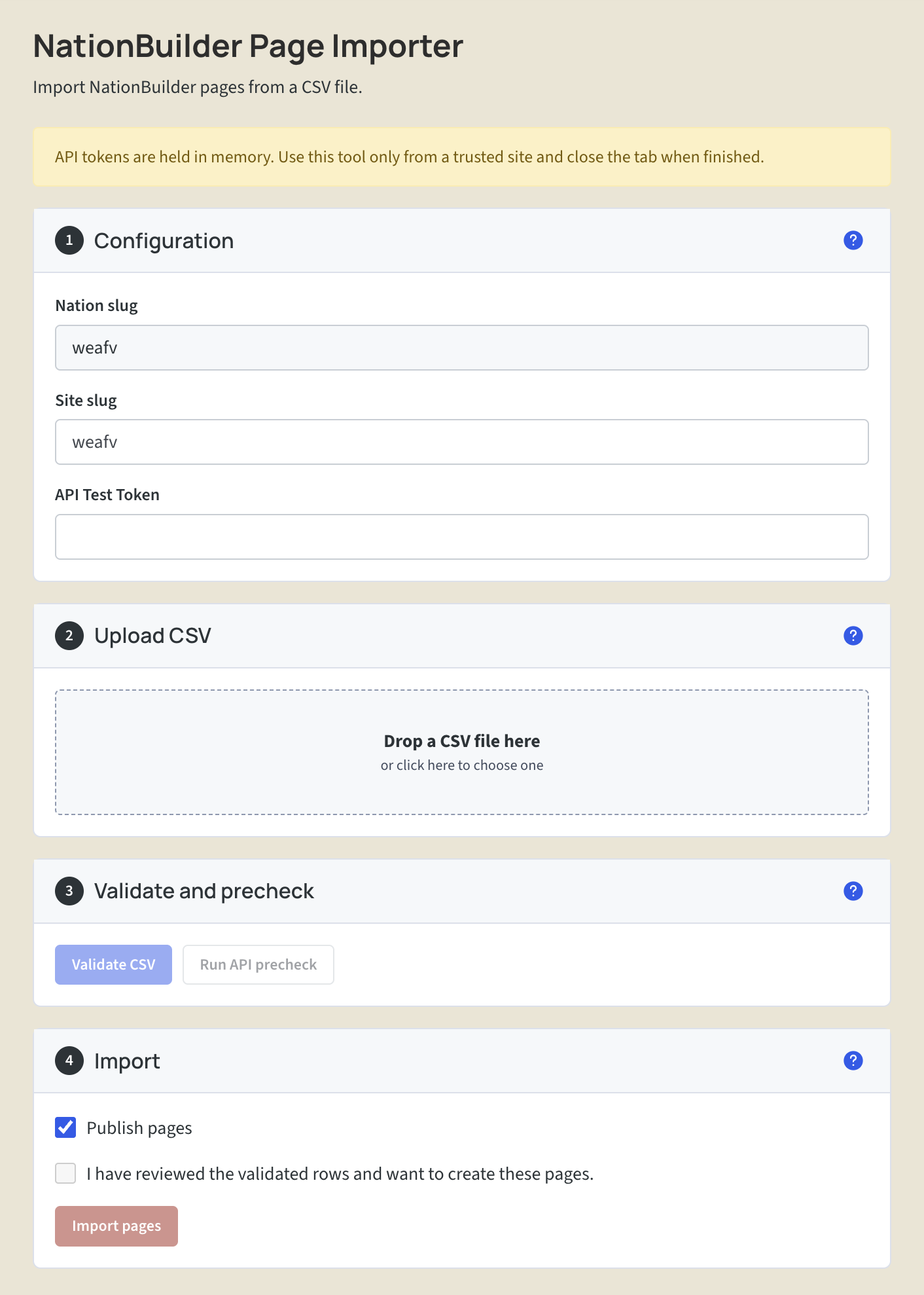
- Configuration: Check the Nation slug and site slug (these should be calculated for you). Generate a V2 developer token for the target Nation and paste it into API Test Token. Legacy V1 tokens are not supported.
- Upload CSV: Drag the CSV file into the upload area or click the area to choose a file.
- Validate and precheck: Click Validate CSV to check the file locally, then Run API precheck to check it against existing pages. Review the results and resolve any errors before continuing.
- Import: Review the validated rows and choose whether to enable Publish pages. Select the confirmation checkbox, then click Import pages.
Click the question-mark icons for more information about each step.
Troubleshooting
Important: the tool must be run on the Nation's primary site (the nation slug and nationbuilder.com URL, i.e: https://weafv.nationbuilder.com/). Most of the time there is only one site in the Nation, but if the nation has multiple sites then please run the tool on the primary site, and set the alternative site slug in the configuration section (step 1 above). This is due to the CORS requirements of the Nationbuilder API.